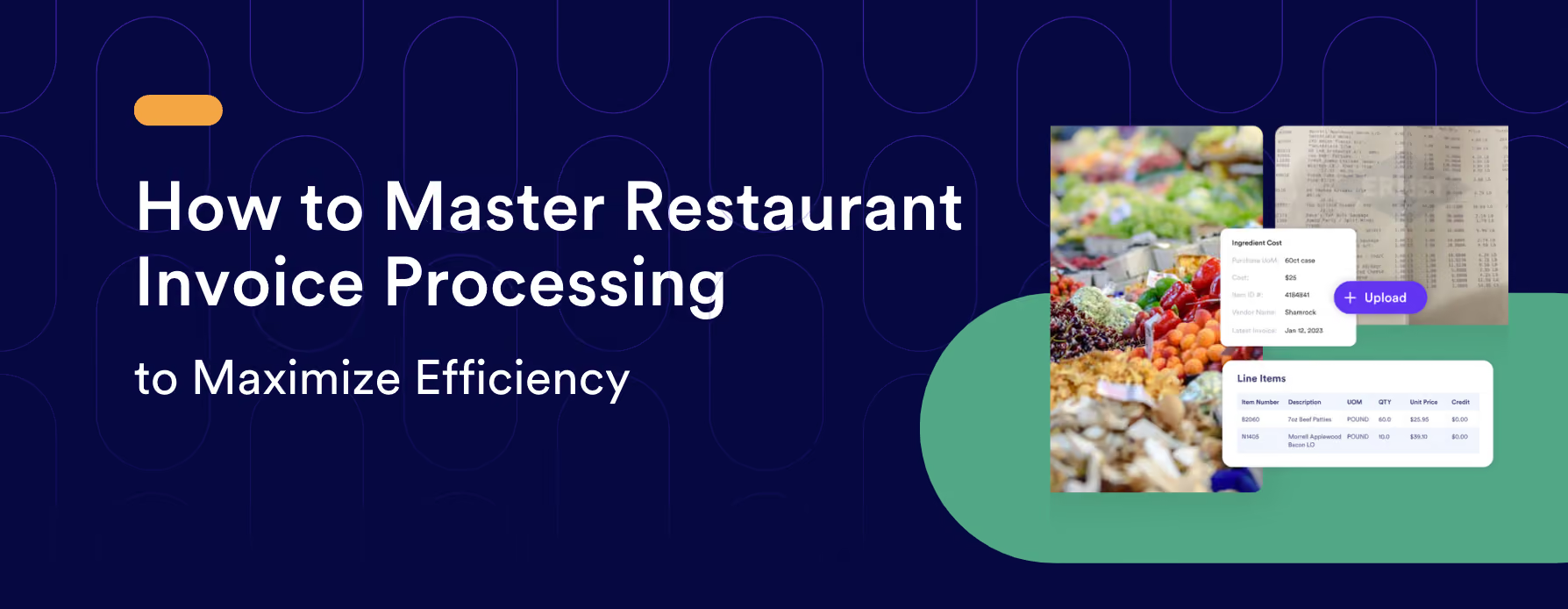
Restaurant Invoice Management: The Complete Guide for Operators
If you're running a restaurant, you're dealing with invoices constantly produce deliveries, protein orders, dry goods, beverages, utilities, equipment repairs. Each one is a cost and a piece of information. And in an industry where margins rarely exceed 5–10%, a disorganized approach to restaurant invoices isn't just an administrative inconvenience. It's a direct threat to profitability.
Effective restaurant invoice processing is one of the most underdiscussed levers in cost control. When you manage invoices strategically not just reactively, you gain accurate visibility into what you're spending, catch errors before they hit your bank account, and build the kind of supplier relationships that create long-term financial advantages.
This guide covers everything operators need to know: what restaurant invoices are, the types you'll handle, the invoice lifecycle, common mistakes, best practices, what to look for in restaurant invoice software, and how automation changes the picture entirely.
What Is a Restaurant Invoice?
A restaurant invoice is a document that a supplier or service provider sends to your operation listing the goods or services delivered and the amount owed. Every time you receive a delivery produce, protein, beverages, linens, pest control, or a utility statement, you're receiving an invoice. It records what was provided, at what price, in what quantities, and when payment is due.
The invoice is both a financial record and a verification tool. It tells you what you agreed to pay and what you actually received. When those two things don't match, money leaks out of your operation quietly and often without anyone noticing until the damage is already done.
Types of Restaurant Invoices You'll Handle
Understanding the categories of invoices flowing through your operation is the first step toward managing them well. Most restaurants deal with six types on a regular basis:
Food and Beverage Supplier Invoices
These are the highest-frequency and highest-dollar invoices for most operations. They come from your produce distributor, protein supplier, dairy vendor, dry goods distributor, and beverage rep. Because food costs represent the largest variable expense in most restaurants typically 28–35% of revenue these invoices deserve the most rigorous review. Price fluctuations are common, and small discrepancies on high-volume items compound quickly.
Equipment and Smallwares Invoices
Kitchen equipment purchases, replacement smallwares, uniforms, disposables, and packaging all generate invoices. These tend to be less frequent but can be significant in dollar value, particularly for capital equipment. Tracking these separately helps with both budgeting and depreciation records.
Utility and Service Provider Invoices
Electricity, water, gas, internet, waste disposal, and payment processing fees arrive monthly. These are often paid on autopay, which makes them easy to overlook but utility rates can change, and billing errors on utilities are more common than most operators realize. Regular review keeps these under control.
Maintenance and Repair Invoices
Emergency repairs, HVAC service, plumbing, hood cleaning, and pest control are largely unpredictable. Because these invoices often arrive for services that weren't planned in advance, they're a common source of approval gaps and duplicate payments.
Contract Services
Linen service, uniform cleaning, landscaping, and security all generate recurring invoices on set schedules. These should be compared against your service agreements to verify rates and terms are being honored.
Miscellaneous Operational Invoices
Licenses, permits, marketing services, and one-time operational purchases round out the picture. Less frequent, but still worth tracking and categorizing.
The Restaurant Invoice Lifecycle
Managing restaurant invoices well means having a clear, repeatable process for every invoice that comes through your door regardless of dollar amount or vendor. Here's what that lifecycle looks like in practice:
Step 1: Receive the Invoice
Invoices arrive through multiple channels: email, EDI (Electronic Data Interchange), vendor portals, or physically with a delivery. The first discipline is collecting all invoices consistently in a single place not split across email threads, a physical inbox on the office desk, and a drawer behind the line. Centralization from the start prevents things from falling through the cracks.
Step 2: Review and Verify
Before any invoice is approved for payment, it needs to be checked against three things: your original purchase order, the delivery receipt, and your agreed-upon pricing. This three-way match is the foundation of invoice accuracy. Check that quantities received match quantities billed, that the price per unit matches your contracted rate, and that no items are listed that weren't actually delivered. This is where most invoice errors and most fraud gets caught.
Step 3: Approve for Payment
Once verified, the invoice moves to an approval step. In a single-unit operation, this is typically the manager or owner. In multi-unit groups, approval workflows need to be defined by dollar threshold and category so the right person is signing off on the right invoices. The approval step is not a formality it's a documented confirmation that someone with authority verified the invoice is accurate.
Step 4: Record in Your System
Approved invoices need to be entered into your accounting or bookkeeping system, whether that's a dedicated restaurant accounting platform, QuickBooks, or a spreadsheet. This is where categorization matters: a produce delivery recorded under the wrong expense category corrupts your food cost data, making it harder to identify where costs are actually running high. Consistent, accurate categorization is what makes your financial reports trustworthy.
Step 5: Schedule and Execute Payment
Most supplier invoices carry payment terms Net 7, Net 15, or Net 30 are common. Paying within terms keeps relationships strong and avoids late fees. Paying too early can strain cash flow during tight periods. The goal is to build a payment schedule that honors terms reliably without creating cash crunches.
Step 6: File for Future Reference
Paid invoices should be stored and organized for a minimum of three to seven years, depending on your jurisdiction's tax requirements. When organized by vendor, date, and category, your invoice archive becomes a powerful tool for year-over-year cost comparisons, supplier negotiations, and tax preparation.
Why Restaurant Invoice Management Directly Affects Food Cost
Here's where the connection gets important for culinary operators specifically: your invoice data is the foundation of your food cost reporting.
If invoices are processed inaccurately, miscategorized, or delayed, your food cost percentages will be wrong. You might think you're running a 29% food cost when you're actually running 33% and you won't know it until the P&L comes in at the end of the month, by which point you've already served thousands of covers at the wrong margin.
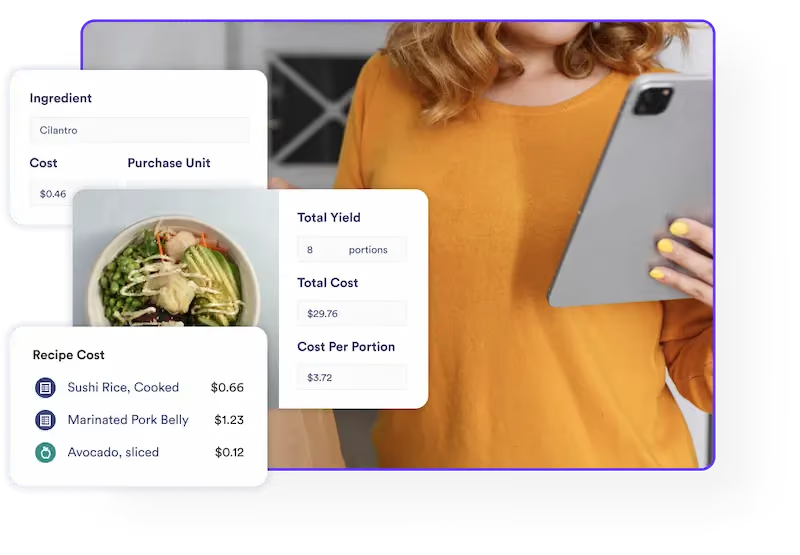
The real power of good restaurant invoice management is that when invoice data flows cleanly into your recipe costing system, your food cost numbers reflect reality. Every ingredient price increase from a supplier updates your recipe costs automatically. Every delivery variance shows up before it becomes a month-end mystery. You're making decisions based on current data, not last month's guesses.
This is exactly why helping you manage food costs effectively depends so heavily on having clean, accurate invoice data in the first place. For more on how food cost accuracy connects to profitability, see Why Your Food Costs May Not Be Accurate (And How to Fix It) and 5 Hidden Costs Eating Into Restaurant Profits.
Common Invoice Errors And How They Drain Profit
Most operators understand the theory of invoice management. The gaps show up in practice. Here are the most common problems and what they actually cost:
Duplicate Payments
Paying the same invoice twice is more common than most operators admit. It typically happens when the same invoice arrives through two channels (email and physical), gets processed by two different people, or gets paid manually without a check against existing records. Without a clear tracking system, duplicate payments often go unnoticed until month-end reconciliation if they're caught at all.
Price Discrepancy Overcharges
Suppliers occasionally bill at prices higher than your negotiated contract rate. This might be deliberate, accidental, or a result of market pricing being applied where contract pricing should govern. If you're not comparing invoice prices against your agreements line by line, these overcharges go straight to your cost of goods. Even a $0.10/lb overcharge on chicken across hundreds of pounds per week is significant over a year.
Receiving Errors Billed as Delivered
Getting billed for items that were shorted on delivery or never delivered at all is a persistent issue with high-volume distributors. Without a clear receiving process that compares delivery against the invoice at the dock, you're trusting the supplier's accuracy instead of verifying it.
Miscategorization
An invoice recorded under the wrong expense category distorts your cost reporting without costing you extra money directly, but it costs you the ability to see clearly where your money is actually going. Over time, miscategorized invoices make it impossible to trust your food cost percentage, labor cost percentage, or any category-level benchmark.
Late or Missed Payments
Paying late damages supplier relationships, can trigger late fees, and in the case of critical vendors, can affect your delivery priority. In a tight supply environment, being a reliable payer matters more than most operators realize.
Best Practices for Restaurant Invoice Management
Whether you're managing invoices manually today or evaluating automation, these practices apply across the board:
Centralize Everything
All invoices regardless of channel should flow into a single system. Splitting invoices across email, physical files, and a separate accounting system is where errors and duplicates are born. Centralization is the prerequisite for everything else.
Implement a Three-Way Match Process
Every invoice should be verified against the original purchase order and the delivery receipt before payment is approved. This single habit catches the majority of invoice errors before they result in overpayment.
Set Clear Approval Workflows
Define who approves what, at what dollar threshold. A $45 produce invoice and a $4,500 equipment repair invoice should not go through the same approval path and neither should be approved by the same person who placed the order.
Review Invoices Against Contracted Pricing Regularly
If you have negotiated pricing with key suppliers, build a habit of spot-checking invoices against those rates. Suppliers don't always apply contract pricing consistently, and catching a pricing drift early prevents it from compounding.
Track Spending Patterns Over Time
Invoice data is not just about paying individual bills accurately. Aggregated over time, it shows you how ingredient costs are trending, which vendors are increasing prices, and where your spend is concentrated. This is the foundation for supplier negotiation, menu repricing decisions, and budget planning. Pair this with recipe-driven food cost analytics and you have a complete picture of where every dollar is going.
Train Your Team on the Process
Anyone who receives deliveries, handles invoices, or approves payments needs to understand the workflow and the reasons behind it. A receiving clerk who doesn't verify quantities against the invoice is a gap in your controls, not just a training issue.
What to Look for in Restaurant Invoice Software
Manual invoice processing scanning paper invoices, hand-keying line items into spreadsheets, cross-referencing against purchase orders by eye is slow, error-prone, and doesn't scale. As your operation grows, the invoice volume grows with it, and the manual approach eventually breaks down entirely.
Restaurant invoice software addresses this by automating the most time-intensive steps: data capture, categorization, price comparison, and integration with your existing financial and recipe systems. Here's what matters when evaluating options:
Invoice Capture Flexibility
The software should handle multiple input methods: photo capture via mobile, scanning, EDI feeds, and email imports. Your vendors don't all send invoices the same way, and your software shouldn't force them to.
Automatic Line-Item Extraction
Good restaurant invoice software extracts individual line items not just invoice totals and maps them to the right ingredients or expense categories automatically. Invoice-level data tells you what you paid; line-item data tells you what you paid for each specific product, which is what connects to food cost.
Integration with Recipe Costing
This is the capability that separates useful from transformative. When your invoice software connects to your recipe costing system, every price update from a supplier automatically flows through to your recipe costs. A tomato price increase shows up in every recipe that uses tomatoes immediately, accurately, without manual recalculation. This is the difference between knowing your food cost and guessing at it.
Reporting by Vendor, Category, and Date
Strong reporting capabilities let you analyze spending patterns, identify cost trends, and build the data you need for supplier negotiations. Category-level reporting is especially valuable for food cost management.
Price Verification Against Contracts
The software should flag line items where the billed price doesn't match your contracted rate automatically, before payment is processed, not after you've already paid.
How meez Simplifies Restaurant Invoice Processing
meez offers a purpose-built solution that connects the invoice management workflow directly to recipe costing which is where the real financial impact lives for culinary operators.
Here's how it works in practice:
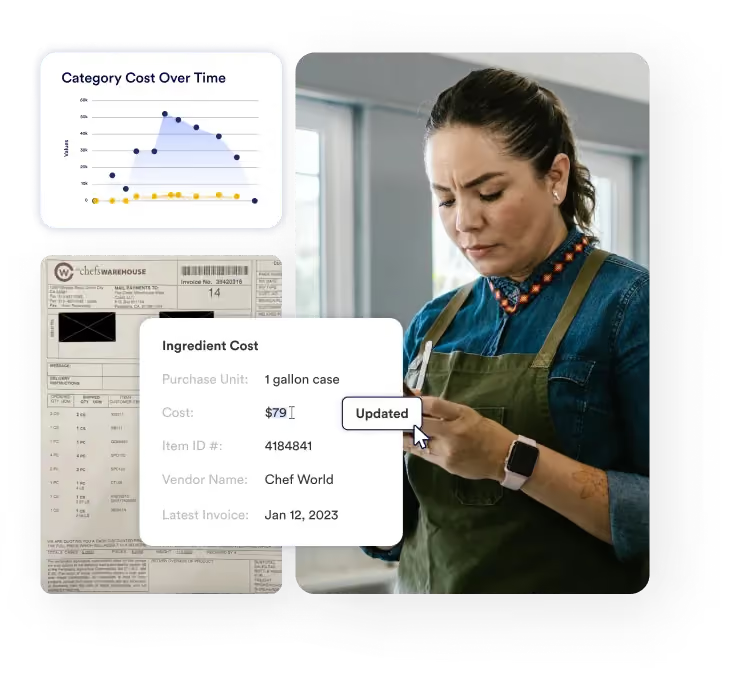
Scan or Snap: Capture invoices by scanning them, snapping a photo with your phone, or using Electronic Data Interchange (EDI). The input method adapts to your workflow, not the other way around.
Seamless Integration: Once captured, the line items on your invoices are automatically connected to the ingredients in your meez account. A delivery of beef tenderloin doesn't just create an accounting entry it updates the cost of every recipe that uses beef tenderloin.
Automated Recipe Cost Updates: With every processed invoice, meez automatically updates ingredient costs, yields, and unit conversions across your recipe database. Your food cost percentages stay accurate in real time, not just at month-end. This means your food cost calculations reflect what you're actually paying today, not what you were paying six weeks ago.
Detailed Reporting: Generate tailored reports by vendor, category, or date range to analyze spending patterns and identify cost-saving opportunities. When you can see that one protein supplier has raised prices three times in the past quarter while a comparable supplier hasn't, that's a conversation you can have with data.
Cost Tracking Over Time: Track ingredient price fluctuations and spending patterns across periods, giving you the basis for informed menu pricing decisions, supplier negotiations, and budget adjustments.
By connecting invoice processing to inventory management and recipe costing in a single platform, meez eliminates the gap between what your invoices say and what your recipes actually cost the gap where most food cost variance hides. For a broader look at how this connects across the operation, see Menu Engineering & Food Costing Software and A Chef's Guide to Accurate Recipe Costing.
Invoice Management for Multi-Unit Restaurant Operators
Single-location operators face invoice management challenges. Multi-unit operators face those challenges multiplied by every location and then some.
When you're managing invoices across five, ten, or fifty locations, the volume alone makes manual processes untenable. But the bigger problem is visibility: without centralized data, you can't see how ingredient pricing at one location compares to another, you can't identify which locations have drifted from contracted pricing, and you can't aggregate spend data across the enterprise to negotiate better terms.
Effective restaurant invoice management at scale requires a system that consolidates invoice data across units, normalizes it into consistent categories, and makes it accessible for analysis at both the unit and enterprise level. The operators who get this right gain a structural cost advantage over those still managing invoices location by location.
For operators running multiple concepts or locations, meez's multi-unit operator tools are built specifically for this challenge centralizing recipe, cost, and invoice data across the entire operation.
Frequently Asked Questions
1. What is a restaurant invoice?
A restaurant invoice is a document from a supplier or service provider that lists the goods or services delivered to your operation and the amount owed. It's both a payment request and a verification document and every delivery your restaurant receives should generate one. Managing restaurant invoices well means verifying each one against your purchase order and delivery receipt before authorizing payment.
2. What's the difference between restaurant invoice processing and invoice management?
Invoice processing refers to the mechanical steps of handling an invoice: capturing it, extracting the data, recording it, and paying it. Invoice management is the broader discipline including the controls, workflows, reporting, and analysis that ensure invoices are accurate, paid on time, and feeding useful financial data into your operation. Good invoice management turns the processing workflow into a source of operational intelligence, not just a payment function.
3. How does restaurant invoice software save money?
Restaurant invoice software saves money in several ways: by catching pricing discrepancies before payment, preventing duplicate payments, eliminating manual data entry errors, keeping recipe costs current as ingredient prices change, and generating the spending data you need to negotiate better terms with suppliers. For high-volume operations, the time savings alone moving from hours of manual entry to minutes of automated processing represent significant labor cost reduction.
4. How often should restaurants reconcile invoices?
At minimum, weekly. High-volume operations with multiple daily deliveries may need daily reconciliation for food and beverage invoices. The goal is to catch discrepancies close enough to the delivery that they're easy to resolve not weeks later when the vendor's records are harder to pull and your receiving team can't remember the details of a specific delivery.
5. What should I do if I find an overcharge on a restaurant invoice?
Document it immediately note the invoice number, the line item, the billed price, and the contracted or expected price. Contact your vendor's billing or sales representative directly with the documentation and request a credit memo. Most legitimate suppliers will correct billing errors promptly. If overcharges are recurring, it's a conversation for your account rep about how their billing process works and potentially a factor in your supplier evaluation.
6. How does invoice management connect to food cost control?
Directly and fundamentally. Your food cost percentage is only as accurate as the ingredient prices in your costing system and those prices should be coming from your invoices. When invoice data flows cleanly into your recipe costing platform and updates ingredient prices automatically, your food cost reports reflect reality. When it doesn't, you're making menu pricing, purchasing, and portioning decisions based on stale data. For more on this connection, see Why Your Food Costs May Not Be Accurate.
Ready to connect your invoice processing directly to your recipe costs? Get a demo of meez or take a 2-minute interactive tour to see how it works.